BETA · Pre-release
Manual Install (Developer Mode)
For users who don't want to wait for Chrome Web Store review and want to try the latest fix right away.
Note: This version may not have passed Chrome Web Store review yet. It has been tested internally, but may be less stable than the official release. For most users, we recommend the official Chrome Web Store install
GenFlow (BatchFlow Pro) v2.6.3.5
Latest pre-release · zip file (~105MB)
Installation Steps
- Unzip the fileExtract the downloaded zip to a folder of your choice. (Keep this folder — don't delete it after installing.)
- Open Chrome Extensions pageType
chrome://extensionsin the address bar and press Enter - Turn on Developer modeToggle "Developer mode" on, in the top-right corner.
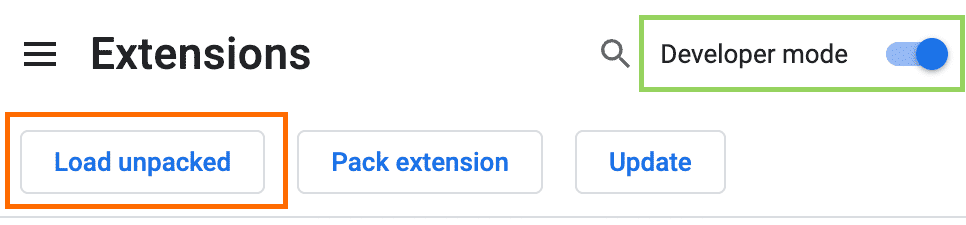
- Load unpacked extensionClick "Load unpacked" → select the folder you extracted in step 1
- DoneIf the GenFlow icon appears in your toolbar, it's installed correctly.
FAQ
- The extension turns off after restarting Chrome.Developer-mode extensions can sometimes be disabled automatically. Just turn it back on from
chrome://extensions. - What do I do once the Web Store version is released?Install the official version from the Web Store, then remove this manually-installed version from
chrome://extensions. Running both at once may cause conflicts.